|
 |
| Settings. Line breaks and paragraphs. |
|
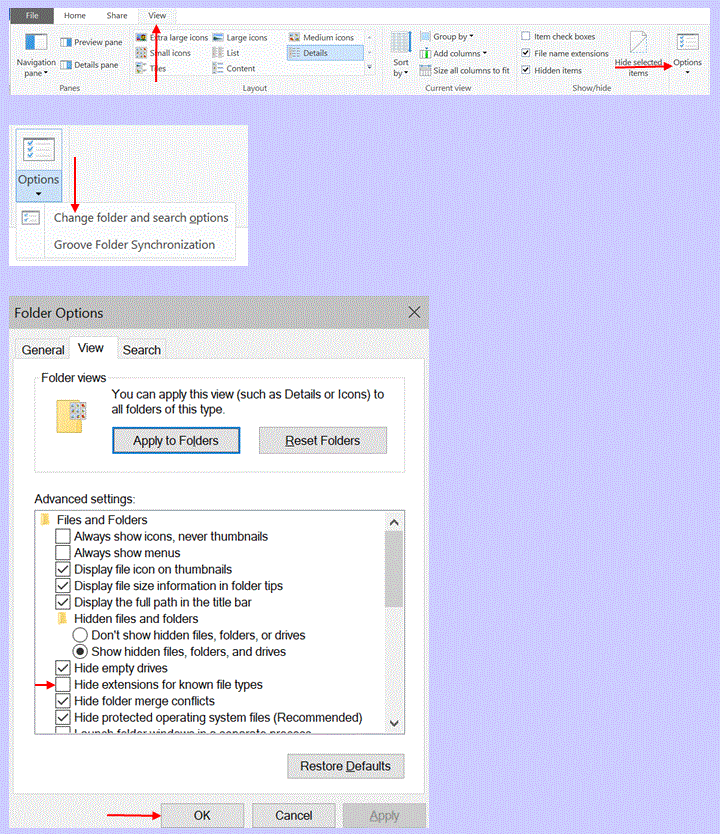
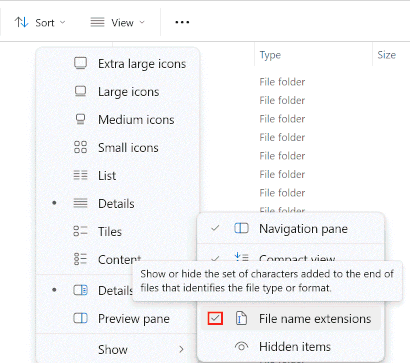
1-1 Example 1: Showing file name extensions in Windows With file name extensions made visible, the name of a file like MyWordFile may appear as:MyWordFile.html |
|
1-1 Orientation 2: Showing file name extensions in Windows If you can complete the next exercise, you can skip the one after it. |
1-1 A 1 Showing file name extensions I
|
|
1-1 A 2 Showing file name extensions II In Windows File Explorer perform these steps:
|
|
1-1 Orientation 3: Full understanding of definitions Ensure you fully understand each definition in the following sections. If needed, use a dictionary or other resources to gain complete clarity on each of these definitions. |
|
1-1 Example 2: HTML file The file: Starfruit01.html is called an HTML file. |
|
1-1 Definition 1: HTML file A file, with its name ending in .html, is called an HTML file. |
|
1-1 Example 3: Characters Here are some examples for characters:
|
|
1-1 Definition 2: Characters Symbols that include letters, numbers, punctuation marks, and other signs are called characters. |
|
1-1 Explanation 1: Characters Characters are used in writing and also for texts written on computers. |
|
1-1 Example 4: Style and size of characters The following line is written with a set of characters in a certain style and a certain size:This is a little text. The following line shows another sentence, written with a set of characters in another style, but with the same size as in the sentence above: |
|
1-1 Definition 3: Font A set of characters of the same style and size is called a font. |
|
1-1 Example 5: Font Here is an example of two sentences written in two different fonts:This is a little text. This is another little text. |
|
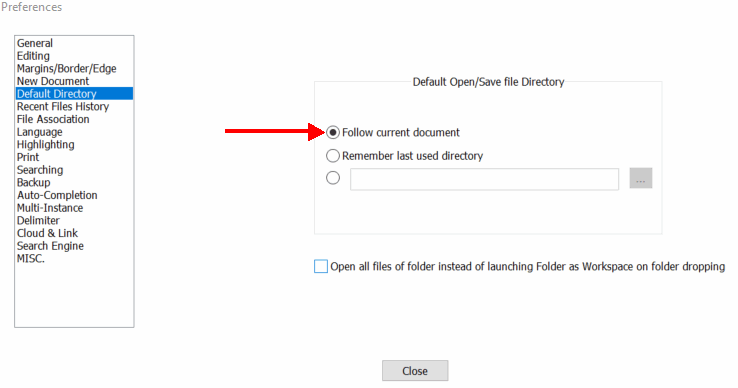
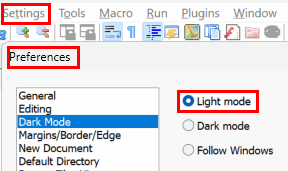
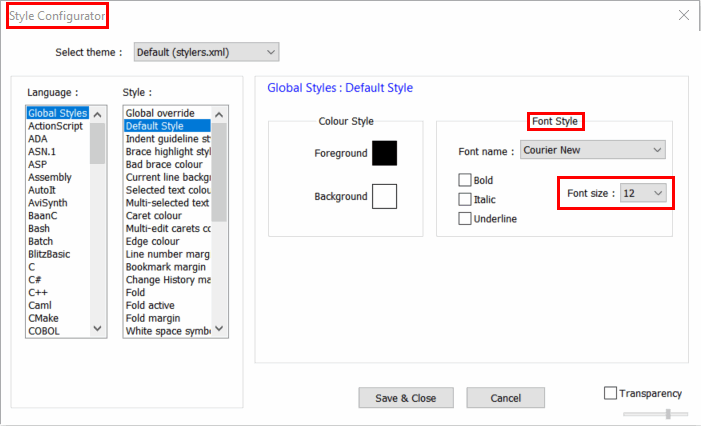
1-1 Orientation 4: Checking and setting up Notepad++ Check if Notepad++ is installed on your computer. If it is not, download the latest version here. Follow the steps outlined below to set up Notepad++. |
|
1-1 Explanation 2: Notepad++ settings I: Default directory
|
|
1-1 Explanation 3: Notepad++ settings II: "Light mode"
|
|
1-1 Explanation 4: Notepad++ settings III: Setting "Font size" to 12
|
|
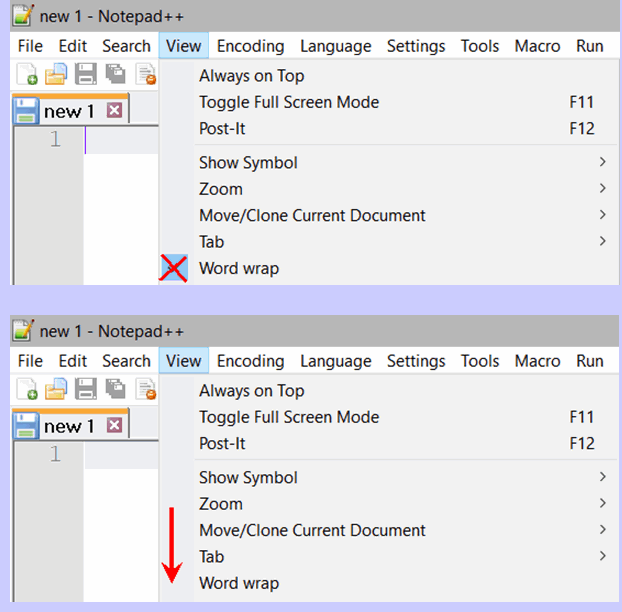
1-1 Explanation 5: Notepad++ settings IV: Unselecting "Word wrap"
|
|
1-1 A 3 Basic folder structure for your HTML files Use the following steps to create the folder structure for the exercises' practice files.
|
|
1-1 Orientation 5: Folder names for the exercises' files in this HTML workbook The files you develop while using this workbook will be saved in three different types of folders, described here: Exercises01 StarfruitJuiceFiles |
|
1-1 Definition 4: Browser An application that allows you to view websites on the internet is called a browser. |
|
1-1 Example 6: Symbols for browsers
|
|
1-1 Example 7: Naming of practice files The following exercise is named 1-1 A 4. The file created for this exercise will be saved as 1-1A4.html. Note, that the file name: 1-1A4.html does not include the spaces seen in the exercise number: 1-1 A 4.html. |
|
1-1 Orientation 6: Creating and viewing an HTML file The next 6 exercises guide you to create an HTML fil and display it in a browser. |
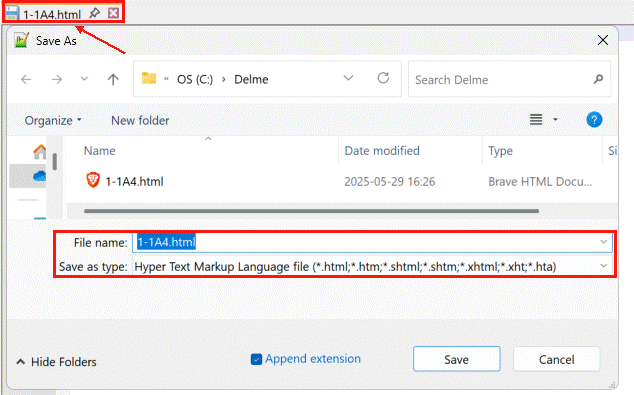
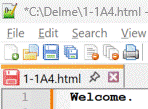
1-1 A 4 Creating an HTML file in Notepad++
|
1-1 A 5 Editing an HTML file in Notepad++
|
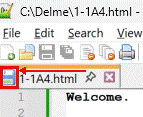
1-1 A 6 Saving the edited HTML file
|
1-1 A 7 Opening an HTML file in a browser
|
1-1 A 8 Opening an HTML file in Notepad++
|
1-1 A 9 Editing an HTML file in Notepad++
|
|
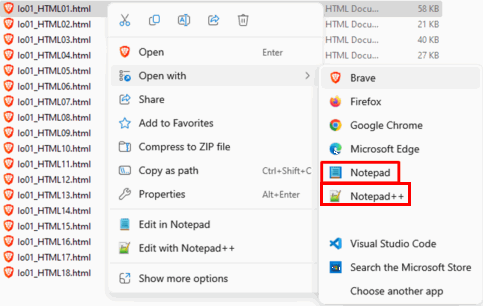
1-1 Explanation 6: Editing and viewing HTML files To edit an HTML file, open it in Notepad++. To view an HTML file, open it in a web browser. |
|
1-1 Orientation 7: Notepad++ for HTML files Continue to use Notepad++ to create the HTML files for the following exercises. |
|
1-1 Explanation 7: Naming and saving of the practice files Unless otherwise specified, use the corresponding exercise number to save the HTML files you create for the exercises. Remember to leave out any spaces seen in the number. |
1-1 A 10
|
1-1 A 11 Predict
|
1-1 A 12 Discover
Explain what <br> does: |
|
1-1 Example 8: <br> To display Welcome. Welcome. in two lines, you need to write the following line into an HTML file: Welcome<br>Welcome. |
|
1-1 Explanation 8: <br> <br> breaks a line. Text following <br> is displayed on the next line. |
|
1-1 Definition 5: Angle brackets The less-than sign: < and the greater-than sign: > are also referred to as angle bracket. |
|
1-1 Example 9: Angle brackets In <br>, br is written in angle brackets. |
|
1-1 Definition 6: Tag A set of two angle brackets written as: <> is called a tag. |
|
1-1 Definition 7: The break tag: <br> This tag: <br> is called the break tag. |
|
1-1 Example 10: The break tag: <br> The break tag <br> breaks Welcome. Welcome. into 2 lines:
|
1-1 A 13
|
|
1-1 Example 11: Readability of code containing break tags To break this line: Welcome. Welcome. into two lines: Welcome. use the break tag: Welcome.<br>Welcome. For better readability, write the line after the break tag on a new line, like
this: |
|
1-1 Explanation 9: Readability of code containing break tags For better readability of code containing break tags, write any line after the break tag on a new line. |
|
1-1 A 14 The previous exercise asked you to create a file with the following code: Welcome.<br> Welcome. Save the file with the name of this exercise, without the blank spaces seen in the exercise number in the same folder. |
|
1-1 Orientation 8: Saving a new file as a blank file before writing code Whenever you create a new HTML file for the following exercises, follow the steps outlined in the Creating an HTML File with Notepad++ exercise on this page. Always complete step 4: Saving a Blank File before writing any code, and save the file in the Exercises01 folder as described in the exercise. |
|
1-1 A 15
Use the break tag to create an HTML file that shows this text: Welcome. Welcome. Welcome. Welcome. Welcome. Welcome. Welcome. Welcome. |
|
1-1 Example 12: Saving files for exercises that include a name The next exercise includes a name alongside its number. When saving the file you create for that exercise, name it by adding Cats_ to the beginning of the exercise's number without the spaces seen in the exercise number. Remember to include the underscore:Cats_1-1A16.html |
|
1-1 A 16
Cats Create an HTML file that displays this content: Cats like to play. But they also like to sleep in the sunlight. They enjoy eating fish. Can cats swim? |
|
1-1 Explanation 10: Saving files for exercises that include a name When saving the file you create for exercises including a name alongside their number, add the name to the beginning of the exercise's number, followed by an underscore: name_number.html |
|
1-1 B 1
Dogs Create an HTML file that displays this content: Dogs like to run. They also like to play with other dogs. Sometimes they bark. They like to fetch sticks. Some dogs bark at strangers. They like to chew on toys. |
|
1-1 B 2
Birds Create an HTML file that displays this content: Birds like to sing. They are good at building nests. Some can fly long distances. Some birds like to fly in groups. Not all birds can fly. But all birds hatch from eggs. |
|
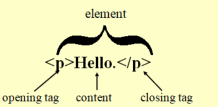
1-1 Definition 8: Opening tag: <> A tag without a forward slash is called an opening tag: <>. |
|
1-1 Definition 9: Closing tag: </> A tag with a forward slash is called a closing tag: </>. |
|
1-1 Definition 10: Tag pair An opening tag and a closing tag are called a tag pair: <></>. |
|
1-1 Example 13: Tag pair This is an example of a tag pair: <p>Hello.</p>. It encloses text. |
|
1-1 Explanation 11: Tag pair A tag pair tells the browser how to display the text it encloses. |
|
1-1 Example 14: Single tag This is an example of a single tag: <br> |
|
1-1 Definition 11: Single tag A tag that stands on its own and does not need a closing tag is called a single tag. |
|
1-1 Definition 12: Element In HTML, a single tag or a tag pair is called an element. |
|
1-1 Explanation 12: Single and paired tags In HTML pages, most tags are paired; only a few are single. |
|
1-1 Example 15: Element with text content
|
|
1-1 Example 16: Elements without content <p></p><br> |
|
1-1 Explanation 13: Single tags and tag pairs Elements are used to tell browsers how to display text. |
|
1-1 Explanation 14: Exercises containing Discover in their name If the word Discover appears next to the exercise number, save your exercise file by adding _Discover to the exercise number. |
1-1 A 17 Discover
|
|
1-1 Definition 13: The paragraph tag pair: <p></p> This tag pair: <p></p> is called the paragraph tag pair. |
|
1-1 Example 17: The paragraph tag pair: <p></p> The following code: will display this text in an HTML document: This is a little text. The paragraph tag pair adds a blank space before and after this text. This is a little text. |
|
1-1 Explanation 15: The paragraph tag pair: <p></p> The paragraph tag pair creates a blank space before and after the text it contains. |
|
1-1 Orientation 9: Including closing tags from the beginning While you may only write a few lines of code and tag pairs now, as your code grows, it will become easier to overlook closing tags, especially when you start with an opening tag and continue adding text without writing the closing tag first. Follow these steps to build the habit of including closing tags from the beginning. |
|
1-1 A 18 How to write a paragraph tag pair Follow these steps to write a paragraph tag pair:
|
|
1-1 Example 18: How to write a paragraph tag pair Use these 4 steps to write the paragraph tag pair:
|
|
1-1 Explanation 16: How to write a tag pair - detailed steps Follow these steps to write a tag pair:
|
|
1-1 Explanation 17: How to write a tag pair - basic steps Follow these 4 steps to write a tag pair that contains text:
|
|
1-1 Example 19: The paragraph tag pair To create an HTML document that displays this text:
The paragraph tag pair adds a blank space before and after this text. This is a little text.
use this code: |
|
1-1 A 19
Using the break tag and the paragraph tag pair, create an HTML file that shows this text: This is the first little text. This is the second little text. This is the third little text. This is the last little text. |
|
1-1 Explanation 18: The difference between <br> and <p></p> The <br> tag causes the text after it to start on a new line.The <p></p> tag pair also causes the enclosed text to start on a new line. But, unlike the <br> tag, it inserts a blank space both before and after the next line. |
|
1-1 B 3
Cats Using the the paragraph tag pair: <p></p>, create an HTML file that shows this text: Cats like to play. But they also like to sleep in the sunlight. They enjoy eating fish. Can cats swim? |
|
1-1 Explanation 19: The word paragraph In everyday language, the word paragraph usually refers to any section of text that starts on a new line. Such sections can be created with the <br> tag.But in the term paragraph tag pair, the word paragraph has a
different meaning. The section of text within this pair also starts on a new
line, but includes a blank space before and after the section. |
|
1-1 B 4
Dogs Create an HTML file that shows this text: Dogs like to run. They also like to play with other dogs. Sometimes they bark. They like to fetch sticks. Some dogs bark at strangers. They like to chew on toys. |
|
1-1 B 5
Birds Using the break tag: <br> along with the paragraph tag pair: <p></p>, create an HTML file that shows this text: Birds like to sing. They are good a building nests. Some can fly long distances. Some birds like to fly in groups. Not all birds can fly. But all birds hatch from eggs. |
|
1-1 B 6 Music Using the break tag: <br> along with the paragraph tag pair: <p></p>, create an HTML file with text about music. Include as many lines as you like. |
|
1-1 B 7 Games Using the break tag: <br> along with the paragraph tag pair: <p></p>, create an HTML file with text about games. Include as many lines as you like. |
|
1-1 Explanation 20: Saving files for your own exercises To save the files for your own exercises, add your one-word name to the beginning of the exercise's number, followed by an underscore: with an underscore:YourName_number.html |
|
1-1 B 8 Your own HTML file Using the break tag: <br> along with the paragraph tag pair: <p></p>, create an HTML file with any text you like. You can use these tags several times to organize your text and create as many lines as needed. |
|
1-1 Explanation 21: The purpose of tag pairs In web pages tag pairs are used to describe how content it is presented. |
|
1-1 Example 20: Paragraph tag pair Without paragraph tag pairs the following sentences will be displayed like this:HTML pages have been designed with the help of experts so that they may be written in many different languages with different characters and can still be transported easily around the world without problems. This has already been accomplished several decades ago. International characters, such as those of the Arabic, Chinese, Japanese and other languages as well as text direction, punctuation and other world language characteristics can be displayed correctly. This support of diverse human languages within a document aids search engines finding content in these languages, assists in better text-to-speech conversion and helps with many other features. With a paragraph tag pair <p></p> the sentences: HTML pages have been designed with the help of experts so that they may be written in many different languages with different characters and can still be transported easily around the world without problems. This has already been accomplished several decades ago. <p>International characters, such as those of the Arabic, Chinese, Japanese and other languages as well as text direction, punctuation and other world language characteristics can be displayed correctly.</p>This support of diverse human languages within a document aids search engines finding content in these languages, assists in better text-to-speech conversion and helps with many other features. the text will appear like this: HTML pages have been designed with the help of experts so that they may be written in many different languages with different characters and can still be transported easily around the world without problems. This has already been accomplished several decades ago. International characters, such as those of the Arabic, Chinese, Japanese and other languages as well as text direction, punctuation and other world language characteristics can be displayed correctly. This support of diverse human languages within a document aids search engines finding content in these languages, assists in better text-to-speech conversion and helps with many other features.The paragraph tag pair: <p></p> has added a blank space before and after the text it encloses. |
|
1-1 A 20 Decide if the following statements are true or false.
|
|
1-1 Definition 14: Marked up content Content enclosed with both an opening and a closing tag, as well as single tags, is called marked up content. |
|
1-1 Example 21: Marked up content Here, the second line is marked up content:Welcome. <p>Welcome.</p> Welcome. |
|
1-1 Definition 15: Hyper Hyper comes from the ancient greek language and means over or above. |
|
1-1 Definition 16: Hypertext Text containing links to other texts or HTML pages is called hypertext. |
|
1-1 Example 22: Hypertext The following line is a hypertext:This is a hypertext. When clicked, it links to an HTML tutorial. |
|
1-1 Orientation 10: Hypertext Instructions for creating hypertext are described on page 17 of this workbook. |
|
1-1 Definition 17: HTML HTML stands for hypertext markup language. |
|
1-1 Explanation 22: HTML Text written in HTML is marked up with tag pairs or single tags and often contains hypertext. |
|
1-1 Explanation 23: HTML The previous explanation can also be written like this: Text written in HTML is marked up with elements and often contains hypertext. |
|
1-1 A 21 Rereading the yellow sections Now that you have gone through the exercises on this page, reread the yellow sections. |
|
1-1 Orientation 11: Creating a web page As you learn to create web pages, you will be guided to gradually develop a series of practice files. The series starts with StarfruitJuice01.html, and leads to the final file: StarfruitJuice15.html. You can view the final file here. The next exercise asks you to create the first file of the series. |
|
1-1 Orientation 12: Naming of the starfruit juice files For the exercises in this HTML workbook, you typically save files using the
exercise number. |
1-1 A 22
StarfruitJuice01.html
|
|
1-1 Submit 1: Study motivation |
|
This page was created by Hanspeter Amend
|
|
|
Solution proposals 1-1 A 15 Welcome.<br> Welcome. Welcome.<br> Welcome. Welcome. Welcome.<br> Welcome. Welcome. 1-1 A 16 Cats like to play. <br> But they also like to sleep in the sunlight. They enjoy eating fish. <br> Can cats swim? 1-1 B 1 Dogs like to run. They also like to play with other dogs. <br> Sometimes they bark. They like to fetch sticks. Some dogs bark at strangers.<br> They like to chew on toys. 1-1 B 2 Birds like to sing. They are good at building nests. <br> Some can fly long distances. Some birds like to fly in groups.<br> <br> Not all birds can fly. <br> But all birds hatch from eggs. 1-1 A 19 This is the first little text.<br> This is the second little text. <p>This is the third little text.</p> This is the last little text. 1-1 B 3 Cats like to play. <p>But they also like to sleep in the sunlight. They enjoy eating fish. </p> Can cats swim? 1-1 B 4 Dogs like to run. They also like to play with other dogs. <p>Sometimes they bark. They like to fetch sticks. Some dogs bark at strangers.</p> They like to chew on toys. 1-1 B 5 Birds like to sing. They are good a building nests. <br> Some can fly long distances. Some birds like to fly in groups. <p>Not all birds can fly.</p> But all birds hatch from eggs. 1-1 A 22 The starfruit, also called carambola, is a sweet and sour fruit that is in the shape of a five-point star. The skin is edible and the flesh has a mild, sour flavor that makes it popular in a number of dishes. The starfruit is yellow or green in color. It comes in two main types: a smaller, sour variety and a larger, sweeter one. |
|