|
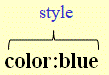
1-5 Example 1: Color style
The style consists of the color property and the blue property value. |
| Fonts and Colors. |
|
1-5 A 1 Discover Create an HTML file with this line: <p style="color:turquoise;">This is a <span style="color:red;">little</span> text.</p> Open the file in a browser and explain the color style and span tag pair. |
|
1-5 Example 1: Color style
The style consists of the color property and the blue property value. |
|
1-5 Orientation 2: Font Review the definition of font on page 1. |
|
1-5 Explanation 1: Font color The font color can be set by the color style: color:color value. |
|
1-5 Explanation 2: The span tag pair The span tag pair: <span></span> can be used to mark words or sections of a text for styling. |
|
1-5 Example 2: Colors of words and text sections The color style in the span tag pair: <span></span> can be used to set the font color of words or sections of a text.The following code: |
|
1-5 A 2
Using the red and magenta property values, create an HTML file that shows the content below. This is a little text with words in different colors. |
|
1-5 Explanation 3: Using <span></span> Use <span></span> only when you need different font colors within a text. For a single-color text, you do not need it. |
|
1-5 A 3
Font color of a heading Using heading 2 and the turquoise property, create an HTML file that shows the content below: HTML pages |
|
1-5 A 4
Font color of a paragraph Using paragraph and the brown property, create an HTML file that shows the content below: HTML pages have been designed with the help of experts, so that they may be written in many different languages with different characters, and can still be transported easily around the world without problems. This has already been accomplished several decades ago. |
|
1-5 A 5
Font color of a text section Using the green property, create an HTML file that shows the content below: HTML pages have been designed with the help of experts, so that they may be written in many different languages with different characters, and can still be transported easily around the world without problems. This has already been accomplished several decades ago. |
|
1-5 A 6
Font color of a text section within a paragraph Create an HTML file that shows the content below: HTML pages have been designed with the help of experts, so that they may be written in many different languages and with different characters, and can still be transported easily around the world without problems. This has already been accomplished several decades ago. |
|
1-5 Explanation 4: Default value If the color style is not set, then the value of the color property will default to black. |
|
1-5 Explanation 5: Color names You can use these color names or these color codes for the values for the color property in the color style, whichever you prefer.For a complete listing of all values for the color property in the color style see: complete color codes. |
|
1-5 A 7
Create an HTML file showing this line: This text is red. |
|
1-5 A 8
Using the align and red, blue and green color styles in headings, create an HTML file showing these lines: Hello.Hello.Hello. |
|
1-5 B 1
Copy this text into a new HTML file and mark up the text so it shows the lines below. Remember to comment your code. HTML pages have been designed with the help of experts so that they may be written in many different languages with different characters and can still be transported easily around the world without problems. This has already been accomplished several decades ago. International characters, such as those of the Arabic, Chinese, Japanese and other languages as well as text direction, punctuation and other world language characteristics can be displayed correctly. This support of diverse human languages within a document aids search engines finding content in these languages, assists in better text-to-speech conversion and helps with many other features. |
|
1-5 B 2
About HTML pages Create an HTML file showing these lines below. Use the "cyan" property value for the color property of the color style for the second heading. What is HTMLHTML stands for HyperText Markup Language. It is the standard language used to create web pages on the internet.Various elementsHTML uses various tags to define how web page looks. These tags indicate how text, images and links are displayed in a web browser.FoundationHTML is the foundation of every webpage you see online. |
|
1-5 B 3 VegetablesAndFruits In a previous exercise you created a file with 2 main titles: Vegetables and Fruit, together with several subtitles and texts. Create a copy of that file and save it with the number of this exercise. Now, apply colors to the titles and the text. But as you do so, be mindful to carefully choose the color names to harmonize the colors, so you create a pleasant reader experience. |
|
1-5 B 4 DreamsAndReality In a previous exercise you created a file with 2 main titles: Dreams and Reality, together with several subtitles and texts. Create a copy of that file and save it with the number of this exercise. Now, apply colors to the titles and the text. But as you do so, be mindful to carefully choose the color names to harmonize the colors, so you create a pleasant reader experience. |
|
1-5 B 5 BooksAndMovies Create an HTML file with 2 main titles and several subtitles: Books and Movies, together with several colored subtitles and texts. |
1-5 A 9
StarfruitJuice05.html
At this point you have 2 identical files, named StarfruitJuice04.html and StarfruitJuice05.html.
|
|
This page was created by Hanspeter Amend
|
|
|
Solution proposals 1-5 A 2 This <span style="color:red;"> is a </span>little text with words in <span style="color:magenta;">different colors</span>. 1-5 A 3 <h2 style="color:turquoise;">HTML pages</h2> 1-5 A 4 <p style="color:brown;"> HTML pages have been designed with the help of experts so that they may be written in many different languages with different characters and can still be transported easily around the world without problems. This has already been accomplished several decades ago. </p> 1-5 A 5 HTML pages have been designed with the help of experts so that they may be written in many different languages <br> with different characters and can still be <span style="color:green;">transported easily</span> around the world <br> without problems. This has already been accomplished several decades ago. 1-5 A 6 <p style="color:blue;"> 1-5 A 7 <p style="color:red;">This text is red.</p> 1-5 A 8 <h2 style="text-align:center;color:red;">Hello.</h2> <h3 style="text-align:center;color:blue;">Hello.</h3> <h4 style="text-align:center;color:green;">Hello.</h4> 1-5 B 1 <!--Red paragraph with blue words--> <!--Green paragraph--> <!--Blue paragraph with red and green words--> 1-5 B 2 <!- - First heading --> <!- - Second heading --> <!- - Third heading --> 1-5 A 9 <!– – Title: Set style attribute for text style. – –> <!– – Line break – –> <!– – Paragraph – –> <!– – Set heading – –> |
|