| Tables. Online HTML Editor. |
|
1-11 Example 1: Table Here is an example of how a table is used to organize texts:
|
|
1-11 Definition 1: Table A table is an arrangement of text in rows and columns. |
|
1-11 Explanation 1: Tables and texts Tables can be used to arrange texts in rows and columns. |
|
1-11 Example 2: Organizing texts in tables This disorganized text:Cats are pets. They often purr. Sparrows often chirp. They can fly fast. Cats like to chase mice. Their claws can be withdrawn. Parrots are birds. They have colorful feathers. Dogs are also pets. They often bark. Sparrows are birds. They have small wings. Dogs like to play fetch. They are known for their loyalty. Parrots can mimic sounds. They like to sit on branches. can be organized in this table:
|
|
1-11 Explanation 2: Organizing texts in tables Using tables to organize texts into rows and columns allows you to separate the texts by category. This makes it easier to read and understand the text, allowing the reader to quickly compare information and grasp the relationships and differences between the various categories. |
|
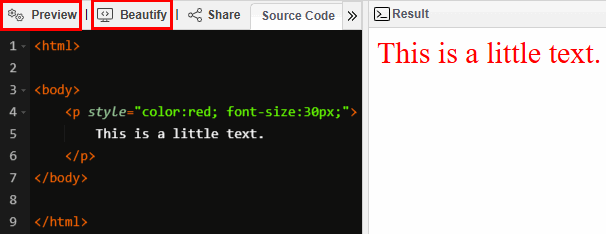
1-11 Orientation 2: Online HTML editor Continue using Notepad++ as you have been. Additionally, use this online HTML editor to quickly preview and evaluate the results of your code: |
1-11 A 1 Online HTML editor
<!DOCTYPE html>
|
|
1-11 Orientation 3: Background color of the online editor If the online editor has a black background, switch to a white background for the following exercises. To do so, click the Toggle Dark/Light Theme button in the top right corner. |
|
1-11 A 2 Discover Type these lines of code into the online HTML editor: <html> </body>
Open this file in a browser and explain these tag pairs:
In your explanation, use the names for the 3 tag pairs. |
|
1-11 Definition 2: The table tag pair This tag pair: <table></table> is called the table tag pair. |
|
1-11 Explanation 3: Three steps to construct a table When constructing a table, the following three essential steps must be followed every time. |
|
1-11 Explanation 4: Building a table: step 1 To build a table, begin with the table tag pair:<table> </table> |
|
1-11 Definition 3: Table row tag pair This tag pair: <tr></tr> is called the table row tag pair. |
|
1-11 Explanation 5: Building a table: step 2 In a table, the table tag pair contrains the table row tag pair:<table> <tr> </tr> </table> |
|
1-11 Explanation 6: Table row tag pair In a table with texts, table row tag pair: <tr></tr> is used to arrange table data in rows. |
|
1-11 Definition 4: Table data tag pair This tag pair: <td></td> tag pair is called the table data tag pair. |
|
1-11 Explanation 7: Building a table: step 3 In a table, table row tag pairs contain table data tag pairs. <table> |
|
1-11 Explanation 8: Table content In a table with texts, table data tag pairs are used to enclose table data, such as text: <td>text</td>. |
|
1-11 Explanation 9: Basic structure of a table For every table you create, start with the following basic structure:<table> |
|
1-11 Orientation 4: Using the online editor for the following exercises For each of the following exercises, begin by typing your code into the online editor. Once complete, copy the code into Notepad++ and save the file with the corresponding exercise number without the spaces. |
|
1-11 A 3
3 rows and 3 columns Create an HTML file, that displays Hello. in 3 rows and in 3 columns:
|
|
1-11 A 4
2 rows and 3 columns Create an HTML file, that displays Hello. in 2 rows and in 3 columns:
|
|
1-11 A 5
3 rows and 2 columns Create an HTML file, that displays Hello. in 3 rows and in 2 columns:
|
|
1-11 A 6 Discover Create an HTML file with this code: <table style="border-style:solid;border-width:5px;border-color:lightblue; <tr> Predict what you will see if you open this file in a browser. Please enter your thoughts and their reasons here: |
|
1-11 A 7 Discover Copy the code from the previously created HTML file into a new HTML file. Then adjust it to convert it into the following code: <table style="border-style:solid;border-width:5px;border-color:lightblue; <tr> Predict what colors you will see if you open this file in a browser. Please enter your thoughts and their reasons here: |
|
1-11 A 8 Discover Copy the code from the previously created HTML file into a new HTML file. Then adjust it to convert it into the following code: <table style="border-style:solid;border-width:5px;border-color:lightblue; <tr> Predict each of the two font families you will see if you open this file in a browser. Please enter your thoughts and their reasons here: |
|
1-11 A 9 Discover Copy the code from the previously created HTML file into a new HTML file. Then adjust it to convert it into the following code: <table style="border-style:solid;border-width:5px;border-color:lightblue; <tr> Predict each of the three font sizes you will see if you open this file in a browser. Please enter your thoughts and their reasons here: |
|
1-11 A 10 Discover Copy the code from the previously created HTML file into a new HTML file. Then adjust it to convert it into the following code: <table style="border-style:solid;border-width:5px;border-color:lightblue; <tr> Why does this not change the fonts in the first two rows of the table? Please enter your thoughts and their reasons here: |
|
1-11 Example 3: Inheritance of font-styles in tables In the tables of the previous exercises, the <td> tags inherit these font styles from the parent <table> tag:
|
|
1-11 Explanation 10: Inheritance of font-styles in tables In a table, the <td> tags inherit all of their font styles from the parent <table> tag:
|
|
1-11 A 11 Discover In the Exercises01 folder, create an HTML file with these lines of code: </body> Open the file in a browser and explain: <td style="border-style:solid;>: |
|
1-11 Explanation 11: Visible border To make table border visible, set the border-style property in the table to the property value
solid:
|
|
1-11 A 12
Create an HTML file, that displays Hello. in 3 rows and in 3 columns in a table with visible borders:
|
|
1-11 A 13 Discover In the Exercises01 folder, create an HTML file with these lines of code: </body> Open the file in a browser and explain <td style="border-style:solid;>: |
|
1-11 Explanation 12: Border pattern for the table tag and for the table data tag To set the border pattern of the table tag pair: <table></table>, or of the table data tag pair: <td></td>, use this style declaration: border-style:property value. <table border-style:property value></table> |
|
1-11 Example 4: Border patterns of the table tag and of the table data tag
|
|
1-11 Explanation 13: Border patterns of the table tag and of the table data tag
|
|
1-11 Example 5: Squares that make up an image This image is made up of a definite number of squares, each of which comes in one of 4 different colors:
|
|
1-11 Definition 5: Pixel One of the small dots or squares that make up an image on a computer screen is called a pixel. The term pixel is a contraction of "picture element." It is a combination of "picture", shortened to "pix", and "element", shortened to "el". |
|
1-11 Explanation 14: Image An image is made up of many pixels. |
|
1-11 A 14 Discover In the Exercises01 folder, create an HTML file with these lines of code: <html> </body> Open the file in a browser and explain: border-width:5px: |
|
1-11 Explanation 15: Border width To set the border width of a table or its cells, use the following style declaration: border-width:property value; |
|
1-11 Example 6: Border width
|
|
1-11 A 15 Discover <html> <table style="border-width: 5px;border-style:solid;border-color:blue"> </body> Open the file in a browser and explain border-color:blue: |
|
1-11 Explanation 16: Border color To set the border color, use the border-color style declaration:border-color:property value; |
|
1-11 Example 7: Border color
|
|
1-11 Explanation 17: Border styles Every table contains one table tag pair: <table></table>, and at least one table row tag pair: <tr></tr>, and at least one table data tag pair: <td></td>.The borders of the table and table data tag pairs can be designed with the following three attributes:
|
|
1-11 Example 8: Styles for borders and text colors Here, the default table styles are overridden by the border-width and border-color styles:
Here, the color:red style is inherited by by the border and the text of the table data child elements :
Here, the border of the first table data child element is overridden by its boder-solid and border-width styles:
Here, the border styles of the first table data child element are overridden by their boder-solid, border-width and border-color styles:
Here, the text of the first table data child element is overridden by their boder-solid, border-width, border-color and color styles:
|
|
1-11 Explanation 18: Invisible borders If the border-style is not specified, then the default values for border-color and border-width cannot be set, and the table's borders will become invisible. Note, that even in a table with invisble borders, the table and its borders still exist - they are just invisible:
|
|
1-11 Explanation 19: Default values for border color and size in a table If the border-style attribute value is specified, but the border-color and border-width attribute values are not specified, then the border color will default to black, and the border width will default to 2px. |
|
1-11 Explanation 20: Indenting table tag pairs When creating a table, remember to indent the <tr></tr> and <td></td> tag pairs. This makes your code easier to read. |
|
1-11 Example 9: Indenting table tag pairs Instead of writing:<table> <tr> write: <table> <tr> |
|
1-11 Example 10: 1 row, 2 columns The following example is a table structure to arrange texts in 1 row and 2 columns: <table> |
|
1-11 Explanation 21: Text in the table data tag The table data tag can be written in two ways, like this: or like this: The first form is easier to understand for short text. Use the second form for longer text. |
|
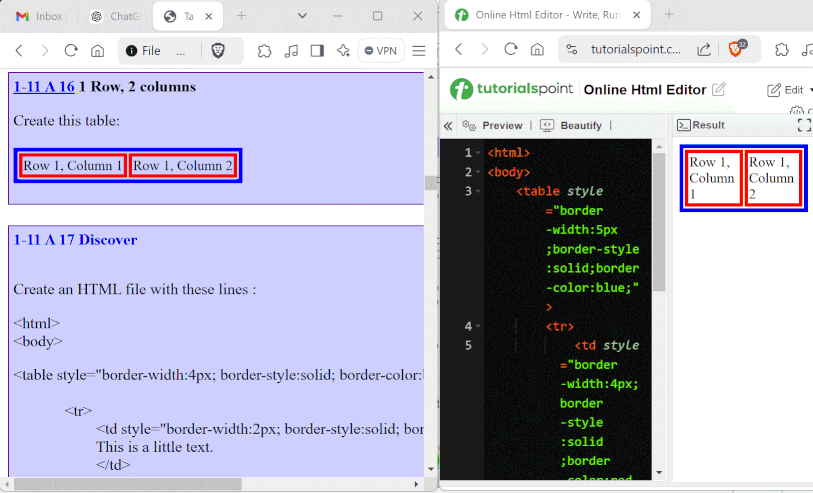
1-11 Explanation 22: Windows arrangement for using the Online HTML Editor
|
|
1-11 Orientation 5: Border colors for the following tables For the following tables, set the blue border width to 5px and the red border width to 4px. |
|
1-11 A 16
1 Row, 2 columns Create this table:
|
|
1-11 A 17 Discover Create an HTML file with these lines : <html> <table style="border-width:4px; border-style:solid; border-color:black"> <tr> </body> Open the file in a browser and explain the <tr></tr> tag pair: |
|
1-11 Example 11: 1 column, 2 rows The following example is a table structure to arrange texts in 1 column and 2 rows: <table> <tr> |
|
1-11 A 18
1 column, 2 rows Create an HTML file that displays this table:
|
|
1-11 Explanation 23: Row and Column In the following exercises R stands for row and C stands for column. |
|
1-11 Example 12: Row and Column R1 stands for row 1. C1 stands vor column 1. |
|
1-11 A 19
Create an HTML file that displays this table:
|
|
1-11 A 20
Create an HTML file that displays this table:
|
|
1-11 B 1
Create an HTML file that displays this table:
|
|
1-11 Orientation 6: Purpose of C-type exercises The pupose of the following C-type exercises is to:
|
|
1-11 C 1
Create an HTML file that displays this table:
|
|
1-11 C 2
Create an HTML file that displays the table below. Where they are given, apply the property values for the font families, the pixel values for the the font sizes, and the color names for the fonts.
|
|
1-11 C 3
Create an HTML file that displays the table below. Apply the given color names and pixel values to the borders' colors and widths.
|
|
1-11 C 4
Create an HTML file that displays the table below.
|
|
1-11 C 5
Create an HTML file that displays the table below.
|
|
1-11 C 6
Create an HTML file that displays the table below.
|
|
1-11 A 21
Create an HTML file that displays this table:
|
|
1-11 A 22
Create an HTML file that displays this table:
|