Commenting code and checking your StarfruitJuice files


Page sections

1-2 A 1 1-2 A 2 1-2 A 3 Cats 1-2 A 4 Dogs 1-2 A 5 Birds 1-2 A 6 1-2 A 7 Music 1-2 A 8 Games 1-2 A 9 Your own HTML files 1-2 A 10 Rereading the yellow sections 1-2 A 11 StarfruitJuice02.html 1-2 Example 1: Uncommented and commented code 1-2 Example 2: Comments' visibility 1-2 Example 3: Starting HTML files with a comment including the exercise number 1-2 Explanation 1: HTML comments 1-2 Explanation 2: Spaces in the comment tag 1-2 Explanation 3: Comments' visibility 1-2 Explanation 4: The purpose of comments 1-2 Explanation 5: Starting HTML files with a comment including the exercise number 1-2 Explanation 6: Copying the file from a previous exercise 1-2 Explanation 7: Creating a new StarfruitJuice file from a previous StarfruitJuice file 1-2 Explanation 8: Checking your StarfruitJuice files 1-2 Orientation 1: Commenting code 1-2 Orientation 2: Copying the file from a previous exercise 1-2 Orientation 3: The StarfruitJuiceFiles folder 1-2 Orientation 4: The importance of adding comments

Workbook pages

1. Settings. Line breaks and paragraphs.

2. Commenting code and checking your StarfruitJuice files

3. Style Terms

4. Headings

5. Fonts and Colors.

6. Simplified HTML structure. Colors.

7. Ordered and unordered lists

8. More List Styles

9. Font Families and Font Sizes

10. Bold, Italic and Underline

11. Tables. Online HTML Editor.

12. Including images in Tables

13. Visual Studio Code. Table Colors.

14. Table Headings and Heights of Table Rows

15. Table Sizes, Borders and Alignments

16. Rice Files

17. Hyperlinks

18. Further studies

1-2 Orientation 1: Commenting code

It is good programming practice to comment your code. The following sections will cover how to do so.

1-2 Explanation 1: HTML comments

To add comments in HTML, enclose your comment within the characters shown below:
<!– – Your comment here. – –>

1-2 Explanation 2: Spaces in the comment tag

There must be no spaces between the opening angle bracket, the exclamation mark and the first dash:
<!– –

Also, there must be no spaces between the last dash and the closing angle bracket:
– –>

1-2 Example 1: Uncommented and commented code

Uncommented code Commented code

The starfruit, also called carambola, is a sweet and sour fruit.<br>
It comes in the shape of a five-point star.<br>
The skin is edible and the flesh has a mild, sour flavor that makes it popular
in a number of dishes.<br>
The starfruit is yellow or green in color.<br>
It comes in two main types: a smaller, sour variety and a larger, sweeter one.

<!– – Taste of carambola – –>
The starfruit, also called carambola, is a sweet and sour fruit.<br>

<!– – Shape of carambola – –>
It comes in the shape of a five-point star.<br>

<!– – Skin of carambola – –>
The skin is edible and the flesh has a mild, sour flavor that makes it popular
in a number of dishes.<br>

<!– – Color of carambola – –>
The starfruit is yellow or green in color.<br>

<!– – Types of carambola – –>
It comes in two main types: a smaller, sour variety and a larger, sweeter one.


1-2 Explanation 3: Comments' visibility

Comments in HTML files are not visible when the file is viewed in a browser. They can only be seen in the code.

1-2 A 1

  1. create an HTML file with this code:
    <!-- About the carambola -->
    The starfruit, also called carambola, is a sweet and sour fruit
  2. open the file in a browser


1-2 Example 2: Comments' visibility

This code:
<!– – About the carambola – –>
The starfruit, also called carambola, is a sweet and sour fruit.
will only show this line in a browser:
The starfruit, also called carambola, is a sweet and sour fruit.

1-2 Explanation 4: The purpose of comments

Your code will certainly run without any comments, but there are several reasons why you should always comment your code. Comments
  1. explain the purpose of specific lines or sections of code, increasing transparency
  2. provide a way to understand what is going on within your code
  3. provide you or other developers with a description of what your code does
  4. will aid comprehension when inspecting at the code at a later time
  5. save time by pointing out how the code works
  6. help identify possible errors and other problems within the code
  7. make it easier to understand why the commented lines or sections work when you revisit your code

1-2 Explanation 5: Starting HTML files with a comment including the exercise number

From now on, every exercise file you create should start with a comment that includes the exercise number:

<!-- exercise number -->

Make sure to follow the comment with a blank line.

Although these comments are not included in the provided solutions, you must still begin the code for each exercise with the exercise number.

1-2 Example 3: Starting HTML files with a comment including the exercise number

For the next exercise, start with this line:
<!-- 1-2A2 -->
Note, that there is a blank space before and after the number in the comment.
After the comment with the exercise number, include a blank line. Then write a comment for the first line of code, followed by the of code:

<!-- 1-2A2 -->


<!-- 1 times welcome -->
Welcome.

1-2 A 2

Create an HTML file that includes comments for this code:

Welcome.<br>
Welcome. Welcome.<br>
Welcome. Welcome. Welcome.<br>
Welcome. Welcome.


1-2 Explanation 6: Copying the file from a previous exercise

For each exercise below, start with this step in the Exercises01 folder: create a copy of your HTML solution file from the matching exercise on the previous page.

1-2 Orientation 2: Copying the file from a previous exercise

In the next exercise, the cats exercise, you will be asked to first copy the previous cats file and then rename it to the name of that exercise.

1-2 A 3 Cats

  1. Open the Exercises01 folder
  2. Within the Exercises01 folder, create a copy of your HTML file for the cats exercise from page 1, which is Cats_1-1A15.html. The copy will be named Cats_1-1A15 - Copy.html.
  3. Using the number of this exercise, rename the copy to: Cats_1-2A3.html.
  4. Comment the code in Cats_1-2A3.html.
  5. Open the file in a browser to check that the comments do not appear


1-2 A 4 Dogs

  1. open the Exercises01 folder
  2. within the Exercises01 folder, create a copy of your HTML file for the dogs exercise from page 1
  3. rename the copy using the number of this exercise
  4. comment the code
  5. open the HTML file in a browser to check that the comments do not appear


1-2 A 5 Birds

  1. open the Exercises01 folder
  2. within the Exercises01 folder, create a copy of your HTML file for the birds exercise from page 1
  3. rename the copy using the number of this exercise
  4. comment the code
  5. open the HTML file in a browser to check that the comments do not appear


1-2 A 6

What is missing in the following code?

Animals live in many different places. <br>
Some animals are very fast.
<p> Others are slow.</p>
They like to eat different kinds of food.


1-2 A 7 Music

  1. open the Exercises01 folder
  2. within the Exercises01 folder, create a copy of your HTML file for the music exercise from page 1
  3. rename the copy using the number of this exercise
  4. comment the code
  5. open the HTML file in a browser to check that the comments do not appear


1-2 A 8 Games

  1. open the Exercises01 folder
  2. within the Exercises01 folder, create a copy of your HTML file for the games exercise from page 1
  3. rename the copy using the number of this exercise
  4. comment the code
  5. open the HTML file in a browser to check that the comments do not appear


1-2 A 9 Your own HTML files

  1. open the Exercises01 folder
  2. within the Exercises01 folder, create a copy of your HTML file with the exercises for your own text from page 1
  3. rename the copy using the number of this exercise
  4. comment the code
  5. open the HTML file in a browser to check that the comments do not appear


1-2 A 10 Rereading the yellow sections

Now that you have gone through the exercises on this page, reread the yellow sections.

1-2 Orientation 3: The StarfruitJuiceFiles folder

Remember to save all of the StarfruitJuice files you will create in the following sections into the StarfruitJuiceFiles folder.

1-2 Explanation 7: Creating a new StarfruitJuice file from a previous StarfruitJuice file

While working with this workbook, you will create several StarfruitJuice files. To create a new StarfruitJuice file, make a copy of the latest StarfruitJuice file and rename the copy with the name of the new StarfruitJuice file.

1-2 A 11 StarfruitJuice02.html

  1. within the StarfruitJuiceFiles folder, create a copy of the StarfruitJuice01.html file
  2. rename the copy of the StarfruitJuice01.html file to StarfruitJuice02.html

At this point you have 2 identical files, named StarfruitJuice01.html and StarfruitJuice02.html.

  1. apply the paragraph tag pair and the break tag to modify StarfruitJuice02.html, to make it look exactly like this.
  2. save StarfruitJuice02.html


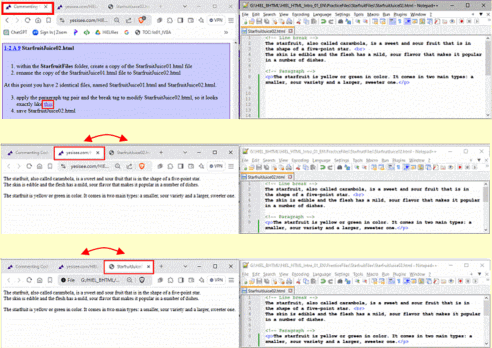
1-2 Explanation 8: Checking your StarfruitJuice files

Check each of your StarfruitJuice files after completing them by following the steps below.

  1. set up 2 windows: the left one for your browser and the right one for Notepad++
  2. in the browser in the left window, open the exercise for the starfruit file in the first tab
  3. click the link in the exercise for the starfruit file - it will open in the second tab
  4. in Windows Explorer, navigate to the folder containing the starfruit file you created
  5. right-click the file to open it in the same browser where the starfruit file for the exercise is displayed
  6. note that your file will be displayed in a third tab
  7. switch between the second and third tabs alternately, to ensure both HTML files look identical
  8. in the first tab, click the link for the starfruit file to jump to the solution code
  9. review your code carefully to ensure that your starfruit file looks exactly like the solution code provided for the exercise. Every character and its position must be identical to those in the solution code. This applies to all StarfruitJuice files you will create for the following exercises.
    Exception: While all comments must be included, you are free to use your own wording for them. In all HTML files you create, including the StarfruitJuice files, your comments can differ from those in the solution.
  10. For all other exercises, it is acceptable if your code differs slightly from the solution, as long as it works. However, the code in the your StarfruitJuice files must be identical to the solutions.
         

1-2 Orientation 4: The importance of adding comments

Adding comments to your code may seem unnecessary when the code is short and simple. And that is completely acceptable.
But, as the number of code lines increases, uncommented code can easily become hard to understand later on. Therefore, start commenting from the beginning, even when the code is simple. This practice helps you to develop a very useful habit and will certainly assist you when reviewing your code at a later time.

This page was created by Hanspeter Amend
Previous page   Table of contents

Solution proposals


1-2 A 2

<!-- 1-2 A 2 -->

<!-- 1 times welcome -->
Welcome.<br>

<!-- 2 times welcome -->
Welcome. Welcome.<br>

<!-- 3 times welcome -->
Welcome. Welcome. Welcome.<br>

<!-- 2 times welcome -->
Welcome. Welcome.


1-2 A 5

<!-- 1-2A5 -->

<!-- break -->
Birds like to sing. They are good a building nests. <br>
Some can fly long distances. Some birds like to fly in groups.

<!-- paragraph -->
<p>Not all birds can fly.</p>

But all birds hatch from eggs.


1-2 A 6

<!-- 1-2A6 -->

Animals live in many different places. <br>
Some animals are very fast.
<p> Others are slow.</p>
They like to eat different kinds of food.


1-2 A 11

<!– – Line break – –>
The starfruit, also called carambola, is a sweet and sour fruit that is in the shape of a five-point star.<br>
The skin is edible and the flesh has a mild, sour flavor that makes it popular in a number of dishes.

<!– – Paragraph – –>
<p>The starfruit is yellow or green in color. It comes in two main types: a smaller, sour variety and a larger, sweeter one.</p>


This page was created by Hanspeter Amend Previous page   Table of contents