|
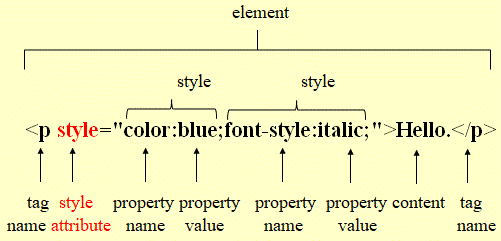
1-3 Explanation 2: Element, style, tag name, style attribute, property name, property value, content This element: <p style="color:blue;font-style:italic;">Hello.</p> will display the text Hello. in blue and italicised: Hello.
|
| Style Terms |
|
1-3 Submit 1: Interactive review of HTML terms |
|
1-3 Orientation 2: Style terms The following sections define and explain style terms. |
|
1-3 A 1 Discover In the Exercises01 folder, create an HTML file with these lines of code: Hello. Hello. <p style="color:red;">Hello.</p> Hello. Hello. Hello.<br> Hello. Hello. Open this file in a browser and explain what <p style="color:red;"></p> does: |
|
1-3 Explanation 1: Displaying text with the paragraph tag pair <p specific instructions>This is a little text.</p> Specific instructions, written within the opening tag of a paragraph tag pair, can be used to modify the appearance of the text within the paragraph tag pair, in a browser. |
|
1-3 Orientation 3: Definition element Review the definition of the word element, which you can find on page 1. |
|
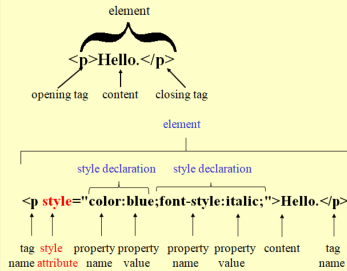
1-3 Explanation 2: Element, style, tag name, style attribute, property name, property value, content This element: <p style="color:blue;font-style:italic;">Hello.</p> will display the text Hello. in blue and italicised: Hello.
|
|
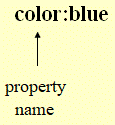
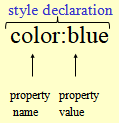
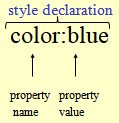
1-3 Example 1: Property name
|
|
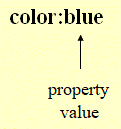
1-3 Definition 1: Property values Values assigned to a property are called property values. |
|
1-3 Example 2: Property values
|
|
1-3 Explanation 3: Property value A property value specifies how the content of an element is displayed in a browser. |
|
1-3 Orientation 4: The Exercises01 folder. Continue with the following exercises inside the Exercises01 folder. |
|
1-3 A 2 Create an HTML file that displays these three words: Hello. Hello. Hello. |
|
1-3 Explanation 4: Property values Several property values such as blue, red or green can be assigned to the color property.Several properties such as italic, bold or underline can be assigned to the font-style property.
|
|
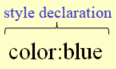
1-3 Example 3: Style declaration
|
|
1-3 Explanation 5: Style declaration
|
|
1-3 Definition 2: Style A single style declaration or a collection of style declarations is called a style. |
|
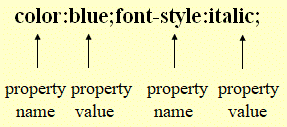
1-3 Example 4: Collection of style declarations Below, you can find an example of a collection of style declarations:color:blue;font-style:italic; |
|
1-3 Explanation 6: Purpose of styles Styles describe how text formatting, colors and numerous other properties will be displayed in a browser. |
|
1-3 Definition 3: Style declaration A single statement, that defines a distinct styling feature, is called a style declaration. |
|
1-3 Example 5: Style declaration
|
1-3 A 3 Four single style declarations
<p style="font-weight:bold;">This
sentence is displayed in bold.</p>
|
|
1-3 Definition 4: Syntax in HTML In HTML, the term syntax refers to the rules for writing and arranging elements, tags, and symbols. The symbols include letters, numbers, and special characters such as periods, colons, semicolons, brackets, angle brackets, quotation marks, and equals signs.
|
|
1-3 Orientation 5: Spotting syntax errors The next three sections are designed to develop your ability to identify syntax errors, helping you recognize them early and write more efficient, error-free code.Each exercise appears as an online form. When you have completed a form and clicked the Submit button, you will see the View Accuracy button. When you click that button, the results will be displayed. They are shown in the following three ways:
|
|
1-3 Submit 2: Syntax errors I Complete this form. |
|
1-3 Submit 3: Syntax errors II Complete this form. |
|
1-3 Submit 4: Syntax errors III Complete this form. |
|
1-3 A 4
Create an HTML file that displays this text: This is a little text. |
|
1-3 A 5 Create an HTML file that displays this text: This is a little text. |
|
1-3 A 6 Create an HTML file that displays this text: This is a little text. |
|
1-3 A 7 Create an HTML file that displays this text: This is a little text. |
|
1-3 Example 6: A style attribute with several style declarations In the following example, four style declarations are combined into a single style attribute:
These style declarations are assigned to the style attribute as follows:
Note that each style declaration ends with a semicolon, including the last one. When this style attribute is applied to a paragraph element <p>Here is a small sentence.</p> it will look like this: <p style="font-weight:bold;font-style:italic;text-decoration:underline;color:blue;"> This style attribute with several styles will change the appearance of the text: "This is a little text." to make it look like this: This is a little text. |
|
1-3 A 8
Create an HTML file that displays this text: This is a little text. |
|
1-3 Definition 5: Attribute A specification, that provides additional information about an element or modifies how elements behave, is called an attribute. |
|
1-3 Explanation 7: Attribute An attribute can be used to change the color, font style and numeours other property values of an HTML elements' content. |
|
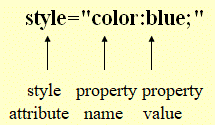
1-3 Definition 6: Style attribute An attribute that specifies how the content of an element is displayed in a browser is called a style attribute. |
|
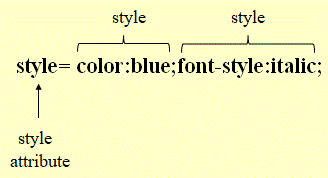
1-3 Example 7: Style attribute
|
|
1-3 Explanation 8: Styles of a style attribute A style attribute may consist of one or several styles. |
|
1-3 Explanation 9: The style attribute declaration
|
|
1-3 Explanation 10: Style attributes Style attributes are specified in the opening tag of an element. |
|
1-3 Explanation 11: The style attribute
|
|
1-3 Example 8: Style attribute A style attribute may be used to set the its color property to the blue value and its font-style property to the italic value. With:<p style="color:blue;font-style:italic;">Hello.</p> "Hello." will be displayed like in blue and italicised: Hello. |
|
1-3 A 9
Create an HTML file that shows this text: Hello. |
|
1-3 Example 9: The align style In the style declaration of this paragraph element the style's property name
is 'text-align' and its property value is
'center', so the element's content will
be center aligned.
This is a little text. |
|
1-3 A 10
Create an HTML file that shows this text: Hello |
|
1-3 Explanation 12: Values for the text-align property The text-align property can be assigned the following values:
|
|
1-3 A 11
Create an HTML file that shows these lines: Hello. Hello. Hello. |
|
1-3 A 12
Create an HTML file that shows these lines: Hello. Hello. Hello. |
|
1-3 A 13 <p style="text-align:left">Hello.</p> Decide if the following statements about the above element are true or false.
|
|
1-3 Orientation 6: HTML tag pairs and styles covered in this HTML workbook Download the HTML_TagsStyles.pdf document here. The document lists all HTML tag pairs and styles covered in this HTML workbook. Print it to keep it by your side while studying with the exercises. |
1-3 A 14
StarfruitJuice03.html
At this point you have 2 identical files, named StarfruitJuice02.html and StarfruitJuice03.html.
|
|
This page was created by Hanspeter Amend
|
|
|
Solution proposals 1-3 A 4 <p style="font-weight:bold;">This is a little text.</p> 1-3 A 8 <p style="font-weight:bold;font-style:italic;text-decoration:underline;color:blue;">This is a little text.</p> 1-3 A 9 <p style="color:red;font-style:italic;">Hello</p> 1-3 A 10 <p style="color:red;font-style:italic;text-align:center;">Hello</p> 1-3 A 11 <p style="text-align:right;">Hello.</p> <p style="text-align:center;">Hello.</p> <p style="text-align:left;">Hello.</p> 1-3 A 12 <p style="text-align:left;">Hello.</p> <p style="text-align:right;">Hello.</p> <p style="text-align:center;">Hello.</p> 1-3 A 14 <!– – Title: Set style attribute for text style. – –> <!– – Line break – –> <!– – Paragraph – –> |
|